

- October 7, 2026
- by Shifline Team
- 16 minutes read
GPS Time Tracking App: How It Works, and How to Choose One in 2026
What if a clock-in could verify more than just the time?
For field teams, it is not only important to be aware of the date of employment for an employee, but also that they were at the correct site. With the help of GPS, Wi-Fi, cell signals and sensors (sensors in the device), location-based attendance is now possible, even if GPS signals are unavailable.
That location data is correlated with clock ins, geofencing, timesheets and workforce records using a GPS Time Tracking App. Prior to adopting one, however, businesses should have answers to larger questions:
Is GPS employee tracking legal?
How accurate is it?
Is it possible to fake where locations are?
How much is it going to cost and what return on investment is it going to provide?
This tutorial will explain the technology, privacy, cost, and restrictions to consider before selecting a solution.
GPS attendance is useful for verification of attendance when location is used as one tool, not as a replacement for workforce policies, supervision, or accurate payroll processes.
What Is a GPS Time Tracking App?
Time tracking software that logs time tracking events tracked by mobile device with geographical data is called a GPS time tracking app.
At its simplest, the workflow looks like this:
Employee → Clock-in → Location captured → Attendance event created → Timesheet → Approval → Payroll/ERP
The system can link a punch to coordinates, a time and date, an employee tag, device data, and in some cases, a specific worksite, other than using a paper register, spreadsheet, or manually entered timesheet.
Typically a gps time clock online solution includes a web browser based administration console in addition to mobile attendance solutions. Attendance records, schedules, locations, overtime, exceptions, and approved timesheets can all be viewed from a single location by managers.
A time clock app with gps that includes gps is especially helpful in the event that workers are not stationed in a set workplace each day. Construction workers and delivery, maintenance, guards, sales and mobile workers can start at different sites.
The key difference between location capture and ongoing surveillance is key. A well-structured system can be set up to record the location at specific attendance points, or during specific working periods, rather than taking the location data all day long.
For example:
- Clock-in: Capture the employee’s location.
- During shift: Capture periodic location only if the operational use case requires it.
- Clock-out: Record the final attendance event.
- Off duty: Stop location collection unless a separate, lawful operational requirement exists.
This distinction is relevant for employee trust and data protection compliance.
Workforce visibility without unnecessary surveillance
Provide managers with real time attendance information in a way that maintains location collection’s clarity and specificity.
How GPS Clock-In/Clock-Out Actually Works
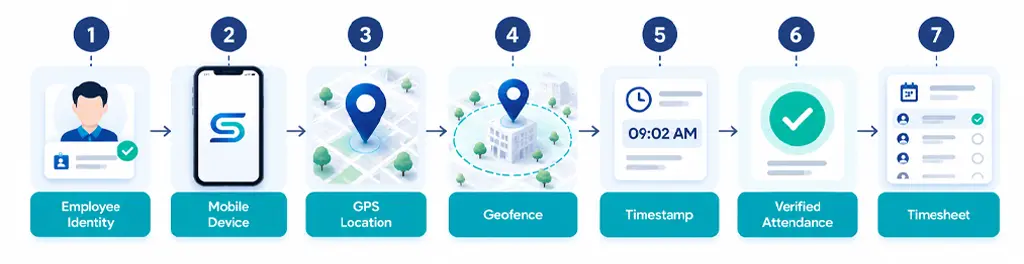
The technical steps in a typical clock in clock out app with gps are relatively simple:
- Employee authentication
When the worker logs in via the mobile application, employee credentials, PIN, facial verification or other supported means. - Location permission
This is based on the operating system, whether it is OK to use approximate or precise location. - Location calculation
The device could use GPS, Wi-Fi, cell phone networks and data from sensors to determine its location. Android explicitly specifies that it can use these signals, not just satellites, to determine Location Accuracy. - Attendance event
Application will track clock-in/clock-out with associated time and location data. - Geofence validation
The system also verifies, if set up, whether the employee has the presence of an approved radius around the assigned worksite. - Server synchronization
If there is internet connection, the attendance event is uploaded to the workforce platform. - Timesheet calculation
Approved punches are transformed into work time, breaks, overtime and payroll-ready time records.
A proper, grown-out solution ought to maintain a record of actions so that administrators can recognize original punches, edits, approvals and exceptions.
Tip: Do not consider GPS attendance as “Does it show employee locations? Does it generate accurate, traceable attendance logs that payroll and HR can work with?
GPS Tracking vs. Geofencing vs. Biometric Verification
These technologies are best suited to address unique challenges and are most effective when combined.
| Technology | What it verifies | Typical use | Main limitation |
| GPS tracking | Device location | Field attendance and workforce visibility | Location accuracy varies |
| Geofencing | Whether device is inside a defined area | Job-site clock-in restrictions | Boundary accuracy can vary |
| Biometric verification | Employee identity | Preventing buddy punching | Requires compatible hardware/software |
| Selfie verification | Person associated with attendance event | Mobile attendance | Needs privacy controls |
| NFC/PIN/Kiosk | Physical or credential-based attendance | Fixed workplaces | Less suitable for dispersed mobile workers |
GPS answers “Where is the device?”
Biometric verification answers “Who is actually clocking in?”
Geofencing answers “Is the device within the permitted work area?”
That difference matters. The GPS is not proof that the individual with the GPS is the employee. Similarly, biometric verification cannot be used to verify that the employee is at the right location at work.
Yet for higher control environments, signals may be combined to make for a more potent attendance event, such as employee identity + device + location + timestamp.
Is GPS Employee Tracking Legal?
GPS employee tracking isn’t necessarily legal or illegal, there’s no one-size-fits-all rule globally.
This is dependent on the jurisdiction, purpose, employment setting, data protection needs, type of device, amount of monitoring and how the information is being treated.
The Personal Data Protection Law (PDPL) governs the handling of personal data for businesses in Saudi Arabia, among others. SDAIA’s guidance outlines principles such as lawfulness, transparency, purpose limitation, data minimization, and storage limitation.
Consent is also addressed in Saudi regulations, which stipulate that the purpose of processing must be apparent and communicated to the person whose data will be taken, where consent is the basis for processing. The Implementing Regulations say consent must be freely given, recorded and related to specific processing purposes.
The lesson to be learned by the employer is clear:
Employers should not think that just because they install a GPS attendance app that they can go monitoring an employee’s location.
A compliant implementation should establish:
- A lawful reason for processing a location.
- Where information about location is gathered.
- The times and places at which collections are made.
- If exact or approximate location is needed.
- The duration of records’ retention.
- Who is able to see your location history?
- The way that employees are informed.
- When an employee uses a personal device.
- How workers can exercise applicable privacy rights.
- How location data is protected and ultimately removed.
A GPS attendance system should not be configured as a blanket track everyone, everywhere tool merely because the technology makes it possible.
Employee Privacy, Consent & “Off-the-Clock” Tracking Rules
A privacy-conscious rollout needs to be a purpose-limited rollout.
Prior to deployment, develop a brief employee policy in response to the following questions:
- What: What location data is collected?
- Why: What operational or attendance purpose requires it?
- When: During clock-in/out, working hours, or another defined period?
- Where: Which devices and work locations are covered?
- Who: Which managers or administrators can see it?
- How long: What is the retention period?
- How: How can employees request information or raise concerns?
Android has a distinction between an approximate location and a precise location, and its developer guidelines say developers should only ask for background location if it is really needed. Android location permissions documentation
This is also an employee-relations issue. Some of the recurring topics in the recent workplace discussion on Reddit were about required location permissions on personal devices, especially if an attendance app is able to use the device outside of working hours. The below individual reports are not a reflection of general employee sentiment, but they show a real concern about how the monitoring is being carried out: employees need to be aware of the limits of what monitoring will and won’t cover.
GCC & Saudi Arabia: WPS and Labor Law Considerations
In the eyes of companies that are doing business in Saudi Arabia and the other GCC countries, GPS attendance should be a part of a broader architecture of workforce compliance and not just a substitute for payroll systems and/or labor systems.
The Saudi Arabia Wage Protection System (WPS) is a programme run by the Ministry of Human Resources and Social Development that aims to track wage-file submissions and adherence to contractual wage obligations.
GPS attendance and WPS have different purposes:
| System | Primary purpose |
| GPS attendance | Verify attendance/location events |
| HR system | Maintain employee and employment records |
| Payroll | Calculate and process compensation |
| WPS | Support wage-file compliance and monitoring |
| ERP | Connect operational, HR, financial, and reporting workflows |
Build compliance into the workflow:
Connect attendance, HR, payroll, and workforce records instead of treating GPS as an isolated tracking feature.
How to Choose the Best GPS Time Tracking App
It isn’t a matter of best features but best solution, which varies according to the operating environment.
You can list job sites by geofence, which might be a priority for a construction company. There may be guard deployment and roster management requirements with a security company. Mobile attendance and route visibility might be required by a logistics operator. For a multi-branch retailer, tracking clock-ins and workforce analytics that are geographically restricted might be more important.
Apply this decision making process:
1. Define the attendance problem
Identify whether you are trying to solve:
- Determine if the problem is to solve for x or y.
- Buddy punching
- Manual timesheet errors
- Remote attendance verification
- Mobile workforce visibility
- Overtime disputes
- Job-site attendance
- Payroll reconciliation
- Shift compliance
- Labor-cost reporting
2. Determine the required location model
Ask whether you need:
- Ask if you have to get:
- Use of GPS for clock-in/out only.
- Periodic location updates
- Normal attendance throughout working hours to the clinic.
- Geofencing
- Location history
- Site-based attendance reports
Don’t pay for continuous tracking if the business need is just for the person to be located at the time of work.
3. Evaluate integrations
A workforce platform can be much more useful when attendance information is fed into:
Attendance – HR – Timesheets – Payroll – Accounting / ERP – Analytics
Seek out integration features such as APIs, exports, integration with payroll solutions, role access, webhook integration, and documented integration requirements.
4. Test the difficult scenarios
Don’t evaluate the system only inside a perfect office environment.
Test:
- Poor cellular coverage
- No internet
- Indoor locations
- Large buildings
- Battery-saving mode
- Employee changing phones
- Enter the clock-in area close to the edge of a Geofence.
- Duplicate punches
- Missed clock-outs
- Device replacement
- Unauthorized location changes
Ask vendors to demonstrate an entire payroll cycle—not just the mobile clock-in screen.
Best GPS Time Tracking Apps by Industry
Rather than selecting a universal winner, evaluate the technology against the workflow of each industry.
| Industry | Core GPS requirement | Additional capabilities to evaluate |
| Construction | Job-site verification | Geofencing, project costing, overtime, mobile timesheets |
| Logistics | Mobile attendance | Route visibility, schedules, mileage, dispatch integration |
| Retail | Store-level attendance | Shift scheduling, branch reporting, overtime |
| Healthcare | Location and shift verification | Shift handover, compliance records, role-based access |
| Security services | Guard/site verification | Rosters, patrol records, deployment, incident reporting |
| Field services | Customer-site attendance | Job assignment, technician scheduling, work orders |
| Manufacturing | Shift and floor attendance | Workforce analytics, overtime, production integration |
Match the technology to the workforce:
Choose attendance controls based on job sites, shifts, employee mobility, payroll requirements, and privacy obligations.
What Does a GPS Time Tracking App Cost and What’s the ROI?
There is no standard GPS attendance price.
Pricing commonly depends on:
- Number of employees/seats
- GPS availability
- Geofencing
- Biometric verification
- Scheduling
- Payroll integrations
- API access
- Reporting
- Data retention
- Support
- Implementation
- Enterprise security controls
A useful market snapshot in September 2026 looks like this:
| Pricing model | Example | What to watch |
| Free tier | Jibble | Feature and support limits |
| Per-seat subscription | Clockify | GPS may require higher tier |
| Base + worker pricing | QuickBooks Time | Total cost rises with workforce size |
| Enterprise quote | Larger workforce platforms | Implementation and integration costs |
How Much Can You Save on Payroll and Time Theft?
You should use your own payroll leakage, not a vendor’s headline percentage to calculate ROI.
QuickBooks is a helpful external indicator. The savings up to 4 percent of payroll is a published figure based on the survey of 1,408 U.S. customers, and is therefore not a guaranteed expected savings and should not be used as such. QuickBooks time tracking research and claims.
A more accurate estimate is:
Annual ROI = Payroll leakage recovered + admin time saved + billable time recovered − software and implementation cost
If a company recognizes, for instance:
- $20,000 annual payroll leakage
- $6,000 annual administrative savings
- $4,000 extra recoverable billable time
- $8,000 annual software/implementation cost
Then:
Net annual benefit = $22,000
It is more meaningful than taking a blanket approach that implies that all businesses will save a fixed percentage.
GPS does not automatically create payroll savings. Savings occur when verified attendance data changes payroll processing, reduces manual corrections, limits unauthorized time, or improves billable-hour capture.
Real-World Limitations: Battery, Offline Mode & GPS Accuracy
GPS attendance is helpful but it is not an ideal measurement system.
Battery consumption
Location services can add to battery usage, especially if the app is asking for regular and detailed location data.
Android’s developer docs make it clear that the more accurate the location, and the more often it’s updated, the more battery life it will consume. Where real-time high accuracy is not needed, it suggests the use of balanced or lower power strategies. Reduce battery usage for location on Android.
Apple also recommends that developers minimize the frequency of location updates and set the right accuracy levels to conserve battery power. Apple Core Location battery advice
Implication: If the location required at attendance events is all that is needed there’s nothing forcing the design of an application that tracks a moving vehicle.
Offline mode
Poor connectivity does not necessarily indicate that attendance needs to be suspended.
A good mobile system can automatically store attendance events on the device and sync with the system when the mobile system comes back. But companies need to determine the application’s behavior with respect to:
- Offline clock-in
- Offline clock-out
- Duplicate submissions
- Incorrect device time
- Delayed synchronization
- Conflicting records
There are some existing products that specifically market “clock-in offline” and “clock-in later” but this is a vendor-specific feature and should be tested when selecting a product. Jibble’s offline tracking capabilities
GPS accuracy
According to Android docs, location estimation can use GPS, Wi-Fi, cellular networks and sensors, particularly when you can’t use satellite signals.
Thus, the location result can be influenced by indoor environment, underground area, large buildings, dense urban environment, weak signals, and settings.
According to Google, GPS may not be reliable indoors or underground, but also Wi-Fi and cellular signals may help determine location.
Do not consider a GPS coordinate to be definitive proof of physical presence but rather a best estimate of the location.
Can Employees Fake or Spoof Their GPS Location?
Yes, location systems are subject to spoofing and other manipulation.
Mobile operating systems offer means for the simulation of locations for developers and testers. Android’s developer documentation mentions test-location providers and classifies locations provided via test providers as mock locations.
Apple also has location simulation for development and testing, including simulated locations and GPX-based routes. Apple simulated-location documentation
Rejecting GPS for workforce use because it is useless is not the answer. Rather, use controls when risks necessitate:
- Geofence validation
- Device integrity checks
- Mock-location detection where supported
- Selfie or facial verification
- PIN/device authentication
- Timestamp consistency checks
- Attendance anomaly reports
- Manager approval
- Audit logs
- Duplicate-device detection
Multi-signal verification is the best design, not only relying on one coordinate.
Don't rely on GPS alone:
Combine location, identity, attendance rules, and audit trails to create stronger workforce records.
How GPS Time Tracking Integrates with Payroll, HR & ERP
The true business worth of gps timesheet app lies in situations when the attendance data is not restricted to the mobile software.
A typical integration architecture looks like:
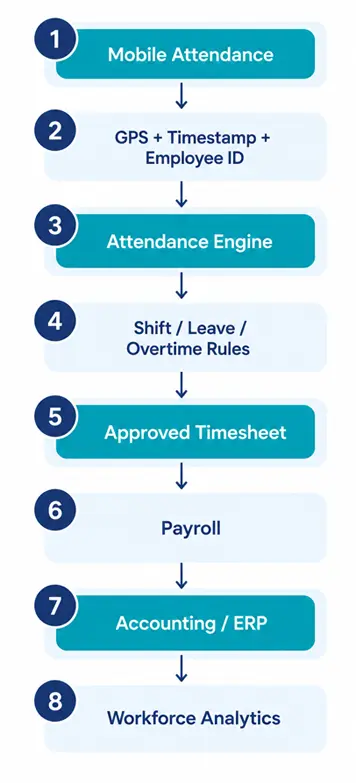
In the case of a field employee, they clock in at an approved worksite, for instance. System tracks the attendance event, verifies the appropriate shift, computes hours worked, and submits the approved timesheet to payroll.
An ERP can then connect labor cost to:
- Projects
- Departments
- Branches
- Customers
- Work orders
- Cost centers
- Payroll
- Financial reporting
This means you can get a more useful management data set than just seeing employees on a map.
Therefore, integration is a must-have feature of Workforce management software and not an add-on.
Internal Integration Opportunities
This topic can be connected with the following Shifline content:
- Online attendance software — for attendance capture and approval workflows.
- Workforce analytics software — for labor-cost and attendance analysis.
- Security roster software — for assigning guards to locations and shifts.
- Security guard management software — for guard deployment, attendance, and site verification.
Implementation Checklist: Rolling Out GPS Time Tracking Without Employee Pushback
Sometimes, technology implementation is not successful because the rules of operation are not explained before the technology is introduced.
Follow this roll out process.
1. Define the business purpose
Document exactly what problem GPS attendance is solving.
Examples:
- Remote attendance verification
- Job-site attendance
- Guard deployment verification
- Mobile workforce scheduling
- Overtime validation
2. Establish a location policy
Specify:
- When tracking starts
- When it stops
- What data is stored
- Retention period
- Who can access it
- Whether personal devices are supported
3. Check local requirements
Examine relevant privacy, labor, employment and data protection laws in each country where employees work.
Include PDPL requirements in the assessment for Saudi Arabia. The recommendations in SDAIA are mainly based on transparency, purpose limitation, data minimization, and the handling of personal data appropriately.
4. Run a controlled pilot
Start with one team or location.
Measure:
- Clock-in success rate
- GPS accuracy
- Battery impact
- Offline synchronization
- Payroll corrections
- Employee questions
- Manager workload
5. Provide alternatives where necessary
Issues of privacy and operation may arise with the use of personal devices. Consider company-managed devices or fixed kiosks if the business needs access to the device that the employees can’t give.
Make adoption easier:
Start with a defined use case, transparent location policy, controlled pilot, and measurable workforce outcomes.
Try Shifline’s GPS-Enabled Attendance & Workforce Management
For companies with remote, distributed or multi-location workforces, Shifline can be integrated into a comprehensive WFM process: attendance visibility, scheduling, workforce operations and reporting.
Looking for assistance to assess GPS workforce tracking?
Describe your team size, work sites, shifts and payroll needs.
Frequently asked questions
It varies by the privacy and employment laws in the area. Employers must be clear about their objectives, make employees aware of that, restrict data collection and adhere to relevant regulations.
It can, particularly if it is frequently or continuously locating. Event-based tracking typically consumes less battery power than continuous GPS tracking.
Yes! If the app has offline support. It stores attendance information on the device, and syncs it when it has connectivity again.
Yes, GPS spoofing is possible on certain devices. This can be mitigated through geofencing, identity verification, device checks and anomaly detection.
No, GPS is used to locate a device, and geofencing is used to see if it is within a specific geographic area or location.
Check GPS clock-in/out, geofencing, offline capabilities, identity verification, payroll integration, audit logs, reporting and security and privacy options.
It offers better attendance and timesheet details, minimising manual corrections, overtime entry and payroll problems.