

- November 6, 2026
- by Shifline Team
- 11 minutes read
Staff Roster Software: All You Need to Know About Australian Companies (2026)
Getting sick or failing to show up for work can lead to a lot of inconveniences. For Australian businesses managing rotating shifts and distributed teams, manual rostering quickly becomes difficult to control.
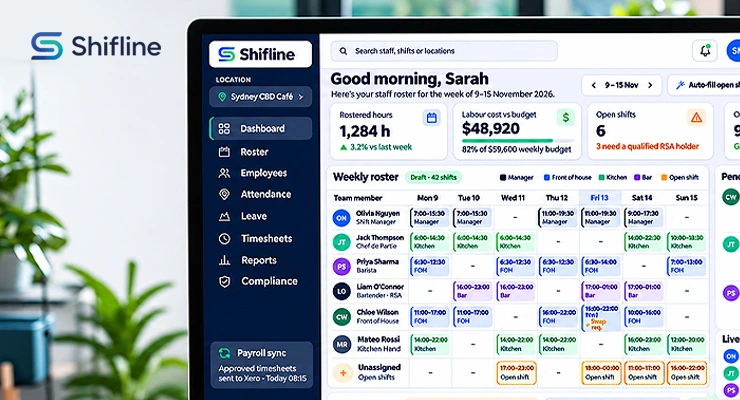
Staff rostering software enables organizations to take advantage of automated scheduling, remote access to the software as well as the possibility to collect and analyze data about the employees’ shifts.
The guidelines of the Fair Work Ombudsman regarding roster management remind businesses that they cannot change employees’ rosters without consulting them.
Make Workforce Scheduling Easier
Implement a more systematic approach to managing staff shifts and scheduling. Look for Shifline.
What Is Staff Rostering Software and How Does It Work?
staff rostering software gives details of working hours, workplace and duties of each employee. If there are employees with uneven contract terms, different skill levels and varying requirements as to working hours, it can be challenging to cope with that without the help of a computerized system.
Nowadays, most of these processes are carried out with the help of a centralized digital system for staff roster software. Managers can deal with a variety of shift scheduling and coverage, take leave requests and communicate information about any changes in the schedule.
The software can also help organize all processes through a strong information base concerning the workforce and the needs of business, taking data from attendance, payroll and human resources reporting systems.
How Rostering Software Works in Five Steps
- Staff information: Produce staff profiles, titles, places of work and availability.
- Filling the workforce: Determine hours of operation, number of employees needed, required qualifications and schedule of shifts.
- Distribution of shifts: Allocate staff manually or automatically obtain the required allocations.
- Distribute roster: Distribute the roster from one point to employees.
- Checking attendance: Check working hours against the schedule.
This is a connecting workflow of planning and realization.
Rostering vs Scheduling vs Shift Planning vs Workforce Management
These terms are related, but they describe different operational activities.
| Term | Primary purpose |
| Rostering | Assigning employees to working days and shifts |
| Scheduling | Organising tasks, activities and time slots |
| Shift planning | Determining staffing requirements and shift coverage |
| Workforce management | Coordinating scheduling, attendance, leave, labour costs and workforce data |
Rostering is one component of workforce management. A broader system connects scheduling decisions with employee records, attendance and operational reporting.
Rostering Software vs Spreadsheets vs Timesheet Apps
| Capability | Spreadsheets | Timesheet apps | Rostering platforms |
| Shift planning | Manual | Limited | Dedicated |
| Availability management | Manual updates | Limited | Centralised |
| Shift changes | Manual communication | Limited | Workflow-based |
| Attendance | Separate process | Core function | Often integrated |
| Labour forecasting | Manual calculations | Limited | Available in advanced platforms |
| Payroll data | Manual transfer | Often supported | Integration-dependent |
Move beyond manual scheduling
Replace scattered roster files with a more structured approach to employee scheduling. Explore Shifline and its workforce management capabilities.
Key Features to Look For in Rostering Software
When selecting a platform, there’s more to it than just if it will enable you to create a weekly roster. Companies should evaluate its ability to manage complexity of scheduling, communications and attendance data.
Essential feature checklist
- Automated shift allocation
- Staff attendance and leave tracking.
- Mobile access
- Seamless shift swapping and approvals.
- Attendance by GPS, as applicable
- Integrating payroll and HR solutions.
- Workforce reporting
- Role-based access controls
- Multi-location management
Auto-Scheduling and Shift Templates
Retail staff rostering software with Automated scheduling reduces repetitive scheduling tasks by connecting the staff with the open shifts.
Below are some of the aspects which a scheduling engine may consider when controlling the scheduling process:
- Availability of employees and their approved leave.
- Required skills and duties of the job.
- Minimum staffing number.
- Maximum working-hour limits.
- Shift patterns and operational demand.
The scheduling program provides managers the ability to generate their schedule several times through templates but this requires managers to consider automated suggestions before proceeding with the application of certain rules and agreements in production.
Mobile App, Availability and Shift Swaps
Rostering app offer staff the ability to check their schedule without relying on a notice board or messages.
Valuable mobile features include:
- Viewing upcoming shifts.
- Submitting availability and leave requests.
- Receiving roster notifications.
- Requesting shift exchanges.
- Checking approval status.
Managers are required to keep control of shift changes. Changes that are suggested must be evaluated against role specifications, employee qualifications and the applicable employment terms.
GPS Clocking In and Geofencing
GPS-enabled attendance systems match expected shifts with actual time spent at work. Geofencing can be employed to create the boundaries of the workplace or job site.
Here’s the basic procedure involved:
- The employee opens the attendance application.
- The application requests location permission.
- The system checks if the device is located within the defined location limit.
- The employee rostering software their clocking-in or clocking-out time.
- The attendance information is submitted for verification and payroll processing.
The accuracy of GPS may differ based on the environment (buildings in the vicinity, device settings, conditions of the network).
Payroll Integrations: Xero, MYOB and Employment Hero
Payroll integrations minimize the chances of entering the same information a couple of times and facilitate automatic transfer of approved hours into payroll workflows.
| Integration area | Data to evaluate |
| Xero | Employee identifiers, timesheets, earnings categories and approval status |
| MYOB | employee rostering software records, pay categories and timesheet transfer |
| Employment Hero | Employee information, attendance and payroll workflows |
For instance, the Xero Australian Payroll API documentation includes an endpoint to create, retrieve, update and approve payroll timesheets. An employee synchronisation and payroll integration overview is also provided in its Payroll API overview.
Keep in mind that it is not necessary for all vendors to have inbuilt support for all payroll products. Hence it is important to use the native API or some third-party connector to integrate with the payroll platform.
Reporting and Labour Cost Forecasting
Reporting on workforce helps the management discover the utilization of the workforce resources.
Useful measurements include:
- Planned vs. actual hours worked.
- Overtime hours by employee or department.
- Labour costs by location.
- Patterns of absences and unfilled shifts.
- Labour requirements versus demand forecast.
Connect scheduling with attendance
Evaluate how mobile access, attendance tracking and workforce reporting can support better operational decisions. Discover Shifline’s workforce tools.
Roster Change Notice, Consultation and Right to Disconnect
Changes in the working rosters will have repercussions on child care, transport, second job and other obligations. Employee rostering software is supposed to follow the requirements provided by the award or agreement in terms of consultations.
Before changing the normal working hours, the employers should do the following steps:
- Inform about the proposed change and timing.
- Have the affected workers express their opinion on the issue.
- Understand how the change will impact their lives.
- Adhere to other requirements related to the consent and notice obligations that arise from the award.
The Fair Work Ombudsman, Changing rosters explains the consultation process.
The concept of the right to disconnect also applies to manager’s communications regarding the change of schedule outside business hours.
Is GPS Attendance Legal? Consent and Workplace Surveillance
Although GPS Time Tracking App may be useful for confirming arrival of workers, staff rostering system companies should be aware of their workplace monitoring and privacy obligations.
Best practices
- List out the reasons for collecting GPS data.
- Provide Notices as required by laws.
- Limit the use of location data to the purposes of good operational logics.
- Do not make uncalled for continuous tracking.
- Employ security measures in respect of the attendance records.
- Establish appropriate retention and deleting policy.
- Protect employees’ information from unauthorized access.
Avoid: Using GPS coordinates to mark attendance, or following employees to a purpose that wasn’t communicated initially.
Moving From Spreadsheets to Rostering Software
It’s not always just a technology upgrade that gets people to move away from spreadsheets.
When it comes to employee scheduling, as people start to work, it’s getting harder to manage the manual process. A centralised attendance management would be easier to understand and a dedicated system can offer centralised records, structured approvals.
Signs You’ve Outgrown Excel
Consider upgrading when:
- Different versions of the same roster are kept by managers.
- Staff fails to receive schedule updates on a frequent basis.
- Multiple manual follow-up is needed for shift swaps.
- Payroll staff time is wasted correcting attendance.
- Overtime only identified once shifts are completed.
- Scheduling must be separate for multiple locations.
An Eight Step Migration Plan
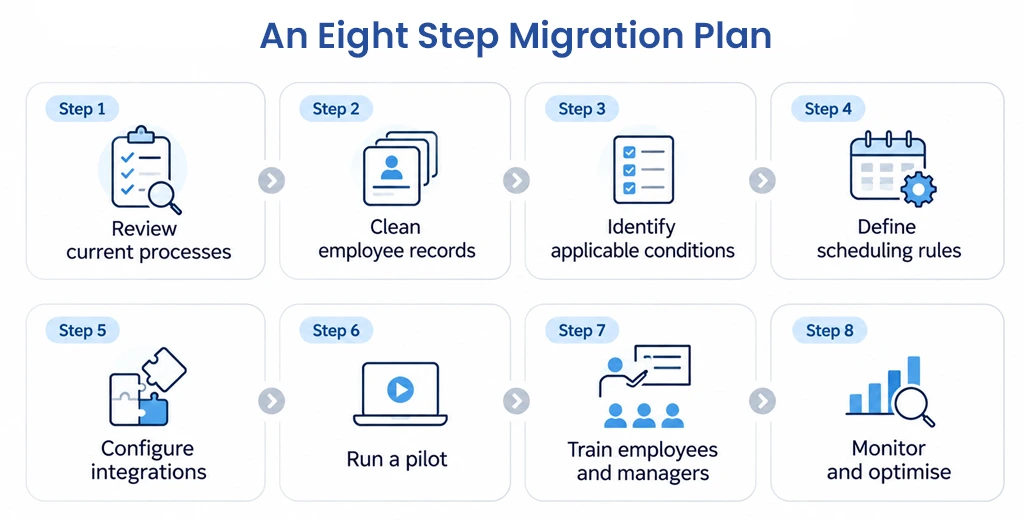
Step 1: Review current processes
In the first step, examine the ongoing protocol regarding shifts, time-off, overtime, and attendance.
Step 2: Clean employee records
In the second step, standardise the employee records which include the employee name, title, location, staff type, and the hours worked by them.
Step 3: Identify applicable conditions
In the third step, check all applicable conditions namely awards, agreements, requirements for working hours, and policies.
Step 4: Define scheduling rules
In the fourth step, outline scheduling rules for making Staffing Rules, Shift Templates, Approval Rules, and Location Rules.
Step 5: Configure integrations
In the fifth step, make the necessary integrations done by setting up employee identification, attendance, and time sheet information.
Step 6: Run a pilot
Run a test with one department, location before expanding.
Step 7: Train employees and managers
Describe the Mobile access, Request for shifting, Recording attendance and escalation process.
Step 8: Monitor and optimise
In the last step, check the scheduling procedures, attendance discrepancies, and wage costs before and after the new schedule implementation process.
A staged deployment allows businesses to detect data problems and make necessary changes in workflows before implementation is completed.
Simplify workforce implementation
Move towards centralised scheduling, attendance and employee information with a platform that supports your operational requirements. Explore Shifline’s workforce management software.
Buyer’s Checklist: Questions to Ask in a Demo
A product demonstration should not only display pretty dashboards but also real-world scenarios on the platform where real workers are interacting.
Use this checklist when considering vendors.
Checklist for evaluating Roasting Software.
Scheduling
- Are there abilities to enable managers to make recurring shift templates?
- Does automated scheduling take into account workers’ schedules?
- Are there gaps in the coverage that the system can detect?
Attendance
- Can it be used to clock in from mobile devices?
- Do you have GPS geofencing?
- Will managers investigate any differences in attendance?
Compliance
- Is there the possibility for configuring different working conditions?
- Is there a work flow available for awards on the platform?
- Are changes to the roster and roster approvals documented?
Integrations
- Does it link up to our payroll software?
- Are employee records able to be synced?
- Can the API be accessed?
Security Scheduling Software and scalability
- Do role based permissions work?
- Are staff resources sensitive information protected?
- Can you have multiple sites?
- May we transfer the data to different providers?
Commercial considerations
- How much will it cost you all year long?
- Do they have onboarding and training?
- What assistance can be provided?
- Is it possible to test the system prior to deployment?
See how a workforce platform works
Try out the flows that impact your business such as employee availability, shift allocation, attendance and reporting.
Improve the Way You Manage Your Workforce
Integrate employee scheduling, attendance, leave and workforce reporting in a more organized management process with best rostering software australia.
Learn how Shifline can help meet your staff management needs.
Explore the platform
Frequently asked questions
Staff rostering refers to the distribution of employees across shifts and responsibilities. Employee scheduling can cover other types of operations including job assignment and different types of operational planning. Staff rostering and employee scheduling are both important parts of managing the availability of workers in an organization.
Automated staff rostering is one must consider aspects such as the industry and size of the workforce as well as compliance and payroll needs. Look at platforms regarding the scheduling automation, mobile attendance, Award related functionality, integrations, reporting and total ownership costs. Test the system in a real working situation.
Some platforms offer award interpretation and automatic pay calculations. But the functions differ from vendor to vendor. The requirements for verification by the business include checking the relevant Modern Award, classification of employees, ordinary hours, penalty rates and overtime provisions. Software programs should be validated with present working demands.
There are numerous platforms that enable workers to book shift swaps, request availability and receive updates on their schedules via mobile applications. Changes may need to be approved by managers prior to becoming effective, however. Approval workflows ensure staffing and the assignment of inappropriate shifts is avoided.
Using GPS to check employees in specific areas can help ensure the process is documented. Ideal for field teams, mobile workers or multi-site operations. However, when using GPS technology companies should also consider location limitations and privacy concerns.